> For the complete documentation index, see [llms.txt](https://docs.nifty.ai/llms.txt). Markdown versions of documentation pages are available by appending `.md` to page URLs; this page is available as [Markdown](https://docs.nifty.ai/analytics/expenses.md).
# Expenses
Track your business expenses in one place. Nifty uses this data alongside your sales to generate [**Profit & Loss**](/analytics/insights-and-reports.md#profit-and-loss) statements.
### Where to find it
Go to [**Expenses**](https://app.nifty.ai/analytics/expenses) (in **Analytics**).
### Recording expenses
You can add expenses manually or import them from a spreadsheet.
**Add** — Click **Add**, then enter the date, description, category, and amount for a single expense.
**Import** — Click **Import** in the top-right to bring in multiple expenses via a spreadsheet. We'll give you a template that you can use.
We provide standard business categories plus specialized ones for resellers. When recording travel for sourcing (driving to the thrift store, rideshare to an estate sale), always use **Sourcing Transportation** — this helps us accurately calculate your total cost of goods.
### Mileage tracking
For personal vehicles, you can track either:
* **Actual expenses** — Gas, repairs, maintenance
* **Mileage** — Distance traveled (we calculate the deduction using US or Canadian rates)
Once you choose actual expenses for a vehicle, you must use that method for the vehicle's lifetime.
For rental cars and rideshare, enter the actual expense amount.
{% hint style="info" %}
**Note for Canadian sellers:** The mileage rate lowers after the first 5,000 km. Nifty doesn't currently account for this reduced rate.
{% endhint %}
### Inventory costs
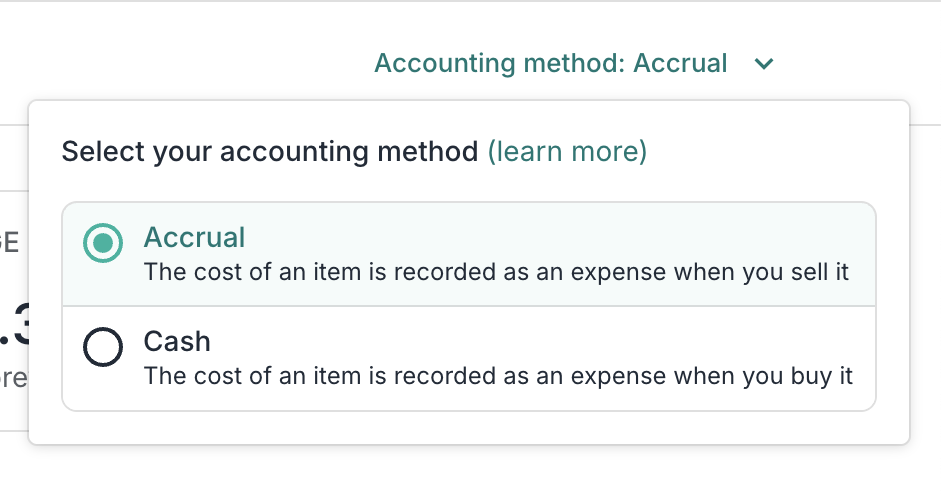
How you track inventory costs depends on your accounting method:
#### Accrual accounting
The cost is recorded when you sell the item.
* Enter **Cost of goods** when creating listings, or after the sale
* Your **Profit & Loss** statement will show a **COGS (Orders)** line item
* Don't add **Inventory Purchases** as expenses — they'll be ignored
#### Cash accounting
The cost is recorded when you buy the item.
* Add purchases under the **Inventory Purchases** category
* Your **Profit & Loss** statement will show an **Inventory Purchases (Expenses)** line item
* You can still add **Cost of goods** to track margins, but it won't affect financial calculations
### Limitations
| Limitation | Details |
| ----------------------- | ------------------------------------------------------- |
| Recurring expenses | No option to set up automatic monthly entries |
| Credit card integration | Can't import expenses from bank or credit card accounts |
| Split transactions | Each expense is one category — split manually if needed |
---
# Agent Instructions
This documentation is published with GitBook. GitBook is the documentation platform designed so that both humans and AI agents can read, navigate, and reason over technical content effectively. Learn more at gitbook.com.
## Querying This Documentation
If you need additional information that is not directly available in this page, you can query the documentation dynamically by asking a question.
Perform an HTTP GET request on the current page URL with the `ask` query parameter, and the optional `goal` query parameter:
```
GET https://docs.nifty.ai/analytics/expenses.md?ask=&goal=
```
`ask` is the immediate question: it should be specific, self-contained, and written in natural language.
`goal` is optional and describes the broader end goal you are ultimately trying to accomplish on behalf of the user. GitBook uses it to tailor the answer towards what is most useful for that goal.
The response will contain a direct answer to the question and relevant excerpts and sources from the documentation.
Use this mechanism when the answer is not explicitly present in the current page, you need clarification or additional context, or you want to retrieve related documentation sections.
.png?alt=media)