> For the complete documentation index, see [llms.txt](https://docs.nifty.ai/llms.txt). Markdown versions of documentation pages are available by appending `.md` to page URLs; this page is available as [Markdown](https://docs.nifty.ai/automation/dashboard.md).
# Dashboard
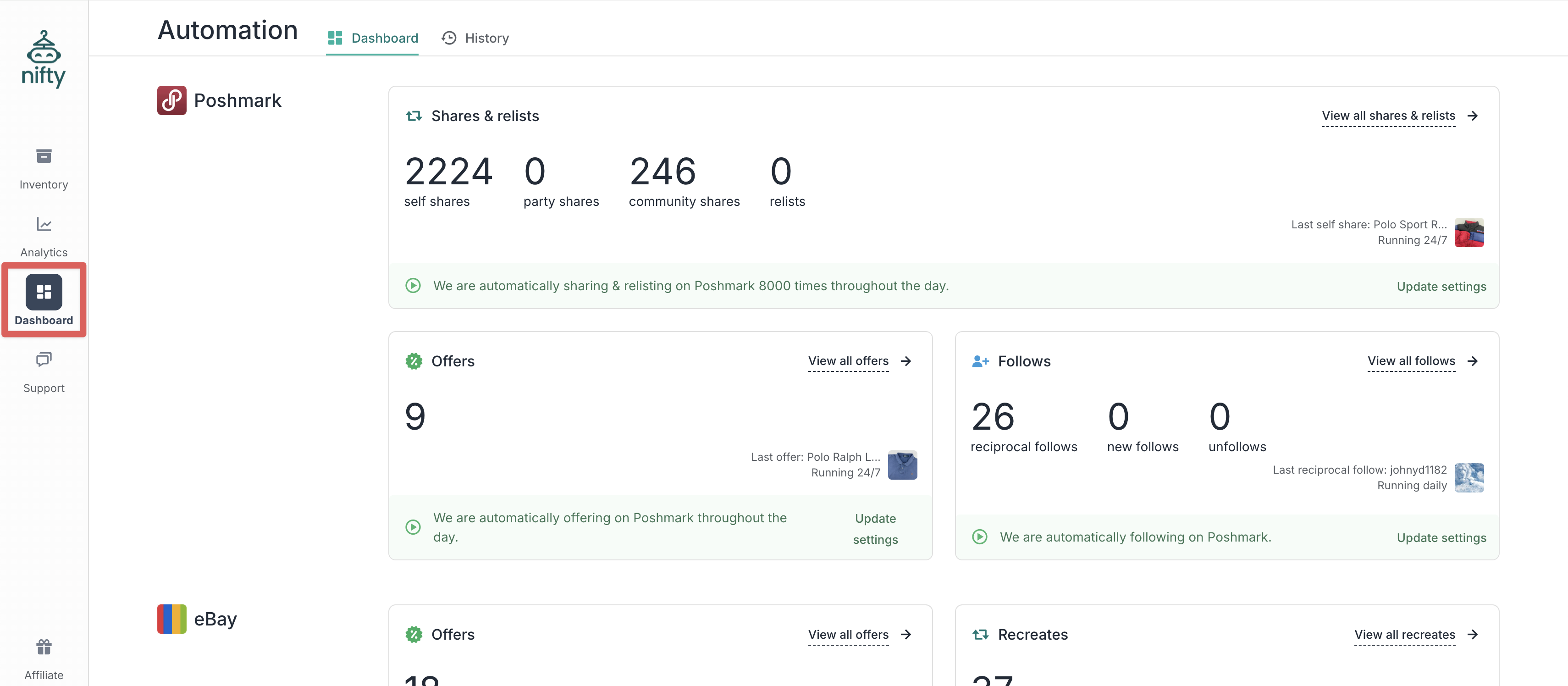
The **Dashboard** is your command center for Nifty's automation features. Set up your **Automations** once, and they run day after day — even while you sleep.
### Where to find it
Click [**Automation**](https://app.nifty.ai/automation) in the left sidebar (computer) or bottom navigation bar (mobile).
### How it works
Nifty’s **Automations** run in the background, even when your computer or phone is off. As long as your marketplace accounts stay connected, Nifty keeps sharing, relisting, sending offers, and following according to the settings you’ve saved.
{% hint style="info" %}
**Note:** It’s okay if your **Inventory Manager** is out of date — **Automations** act directly on your marketplaces and don’t rely on what's shown in Nifty.
{% endhint %}
### Automation types
| Automation | What it does | Available on |
| ----------------------------------------------- | -------------------------------------------------- | ------------------------------ |
| [**Shares**](/automation/automatic-shares.md) | Shares your listings to increase visibility | Poshmark |
| [**Relists**](/automation/automatic-relists.md) | Deletes and recreates listings for fresh exposure | Poshmark, eBay, Mercari, Depop |
| [**Offers**](/automation/automatic-offers.md) | Sends offers to users who liked/watched your items | Poshmark, eBay, Mercari, Depop |
| [**Follows**](/automation/automatic-follows.md) | Follows other users to grow your audience | Poshmark |
### Setting up automations
**To start an automation:**
1. Click **Get Started** to open the settings
2. Turn at least one setting on (toggle moves from gray to green)
3. Click **Save** — your automation starts immediately
**To update an automation:**
1. Click **Update settings**
2. Adjust your settings
3. Click **Save** — changes apply immediately
**To stop an automation:**
1. Click **Update settings**
2. Turn all settings off
3. Click **Save** — automation stops immediately
{% hint style="success" %}
**Tip:** After reconnecting an expired marketplace, click **Get Started** then **Apply Previous Settings** (bottom left) to restore your old configuration.
{% endhint %}
### Daily totals
The **Dashboard** shows today's activity for each automation, plus a preview of the last action ("last community share," "last reciprocal follow," etc.).
{% hint style="info" %}
**Note:** These numbers reset at midnight in the timezone you signed up with. If you check right after midnight and see all zeros, that's expected — it's a new day.
{% endhint %}
### Vacation mode
**On Poshmark, Mercari, and Depop:** When you activate vacation mode, your listings become temporarily unavailable. Nifty pauses self-shares, relists, and offers, but continues community shares and follows. When you disable vacation mode, automations resume the next day.
**On eBay:** You may still allow sales while away, so turn activities off/on as you see fit.
{% hint style="warning" %}
**Important:** Nifty checks your vacation status at the start of each day. If you turn off vacation mode mid-day, your automations won't resume until the next day — or you can restart them manually.
{% endhint %}
### Plans that include Automation
| Plan | Includes Automation |
| ----------------------- | ------------------- |
| Poshmark Automation | ✅ Poshmark only |
| eBay Automation | ✅ eBay only |
| Full Automation | ✅ All marketplaces |
| Bundle Plus / Pro | ✅ All marketplaces |
| Crosslisting Plus / Pro | ❌ Not included |
---
# Agent Instructions
This documentation is published with GitBook. GitBook is the documentation platform designed so that both humans and AI agents can read, navigate, and reason over technical content effectively. Learn more at gitbook.com.
## Querying This Documentation
If you need additional information that is not directly available in this page, you can query the documentation dynamically by asking a question.
Perform an HTTP GET request on the following URL with the `ask` and `goal` query parameters:
```
GET https://docs.nifty.ai/automation/dashboard.md?ask=&goal=
```
`ask` is the immediate question: it should be specific, self-contained, and written in natural language.
`goal` is what the user is ultimately trying to achieve, the reason they need the answer. Sharing it helps GitBook give you a better, more relevant answer. A goal is most helpful when it describes the outcome the user wants rather than restating the question. For example, with `ask=how do I create an API token`, a goal like `build a script that syncs our docs to a CMS` lets GitBook tailor the answer to that use case.
The response will contain a direct answer to the question and relevant excerpts and sources from the documentation.
Use this mechanism when the answer is not explicitly present in the current page, you need clarification or additional context, or you want to retrieve related documentation sections.