> For the complete documentation index, see [llms.txt](https://docs.nifty.ai/llms.txt). Markdown versions of documentation pages are available by appending `.md` to page URLs; this page is available as [Markdown](https://docs.nifty.ai/subscriptions/referrals-and-discounts.md).
# Referrals and Discounts
Save on your first month with a promo code, or earn commissions by referring others to Nifty.
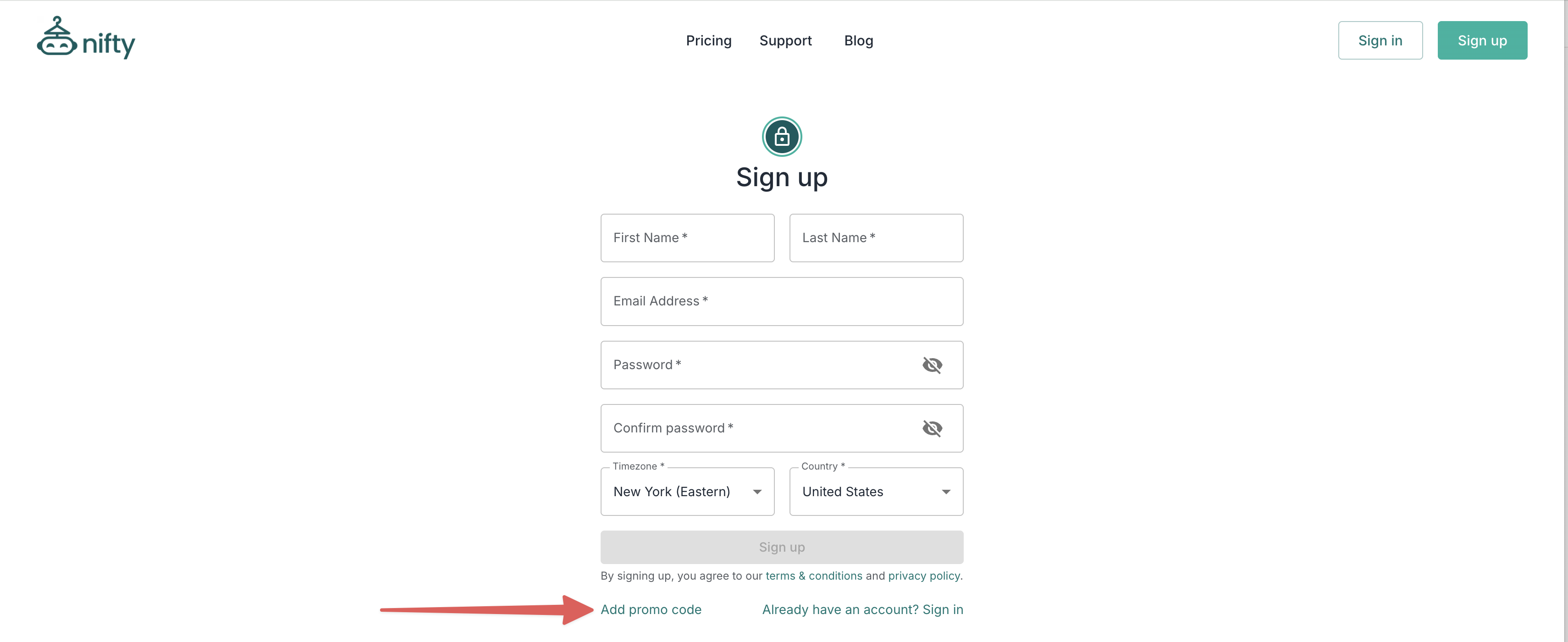
### Using a promo code
New users can get 15% off their first month by entering a promo code at signup. Try `WELCOME15` if you don't have one.
{% hint style="warning" %}
**Important:** Promo codes can only be entered when you create your Nifty account or start your free trial. If you've already started your trial and missed the code entry window, [contact us](mailto:hello@nifty.ai) and we'll help you out.
{% endhint %}
### Affiliate program
Want to share Nifty with others and earn money doing it? Our affiliate program is open to everyone.
#### What you get
* A unique promo code that gives others **15% off** their first month.
* **20% lifetime commission** for every customer who signs up using your code.
#### How to join
Visit the [Affiliate Dashboard](https://nifty.promotekit.com/dashboard) to apply and get your unique code.
{% hint style="info" %}
**Application denied?** Common reasons include codes that are too generic or only contain numbers. Check your denial email for specifics, then reapply with a different code.
{% endhint %}
#### How payouts work
| Detail | Info |
| --------------------- | --------------------------------------------------------------------------------------------------------- |
| **Payout schedule** | Monthly, within the first 12 business days |
| **Minimum payout** | $20 (we hold funds until you reach this amount) |
| **Commission timing** | Net-30 — for example, commissions earned in January are processed end of February and paid in early March |
For full details, check the **Program Guide** at the top of your [Affiliate Dashboard](https://nifty.promotekit.com/dashboard).
#### Troubleshooting
Nifty uses PromoteKit to manage affiliate payments, relying on their system to process payments. If you are expecting a payment but haven't received it yet, please check:
* **Is your PayPal info correct?** Verify it in your [Affiliate Dashboard](https://nifty.promotekit.com/dashboard).
* **Is your balance at least $20?** We hold funds until you reach the minimum.
* **Are we past the 12th business day of the month?** Payouts go out within the first 12 business days of each month.
* **Are you accounting for net-30?** For example, commissions earned in January are processed end of February and paid in early March.
---
# Agent Instructions
This documentation is published with GitBook. GitBook is the documentation platform designed so that both humans and AI agents can read, navigate, and reason over technical content effectively. Learn more at gitbook.com.
## Querying This Documentation
If you need additional information that is not directly available in this page, you can query the documentation dynamically by asking a question.
Perform an HTTP GET request on the current page URL with the `ask` query parameter, and the optional `goal` query parameter:
```
GET https://docs.nifty.ai/subscriptions/referrals-and-discounts.md?ask=&goal=
```
`ask` is the immediate question: it should be specific, self-contained, and written in natural language.
`goal` is optional and describes the broader end goal you are ultimately trying to accomplish on behalf of the user. GitBook uses it to tailor the answer towards what is most useful for that goal.
The response will contain a direct answer to the question and relevant excerpts and sources from the documentation.
Use this mechanism when the answer is not explicitly present in the current page, you need clarification or additional context, or you want to retrieve related documentation sections.