> For the complete documentation index, see [llms.txt](https://docs.nifty.ai/llms.txt). Markdown versions of documentation pages are available by appending `.md` to page URLs; this page is available as [Markdown](https://docs.nifty.ai/getting-started/ways-to-work.md).
# Ways to Work in Nifty
Once you've finished the [Quickstart](https://docs.nifty.ai/getting-started/quickstart.md), there are two ways sellers use Nifty day to day: create new listings in Nifty and let it publish everywhere, or keep listing on a marketplace and crosslist from Nifty. Either way, every listing lands on one row of the [**Inventory Manager**](https://docs.nifty.ai/inventory-management/inventory-manager.md), linked for [**Auto-Delisting**](https://docs.nifty.ai/auto-delisting/auto-delisting.md).
### Way 1: Create new listings in Nifty
This is the way most sellers settle into: enter each item once and Nifty lists it everywhere. Listings you create here are verified automatically, and when you edit them later, every marketplace updates together.
Go to the [**Inventory Manager**](https://app.nifty.ai/inventory) and click **Add item**. Common details go at the top, and Nifty fills in the matching category, brand, and size for each marketplace below — so you never repeat yourself. See [Creating and Editing Items](https://docs.nifty.ai/crosslisting/creating-and-editing-items.md) for a tour of the form.
From there, you can write the listing yourself or let AI write it:
* **You write it.** Fill in the title, description, and details, pick your marketplaces, and click **List item**.
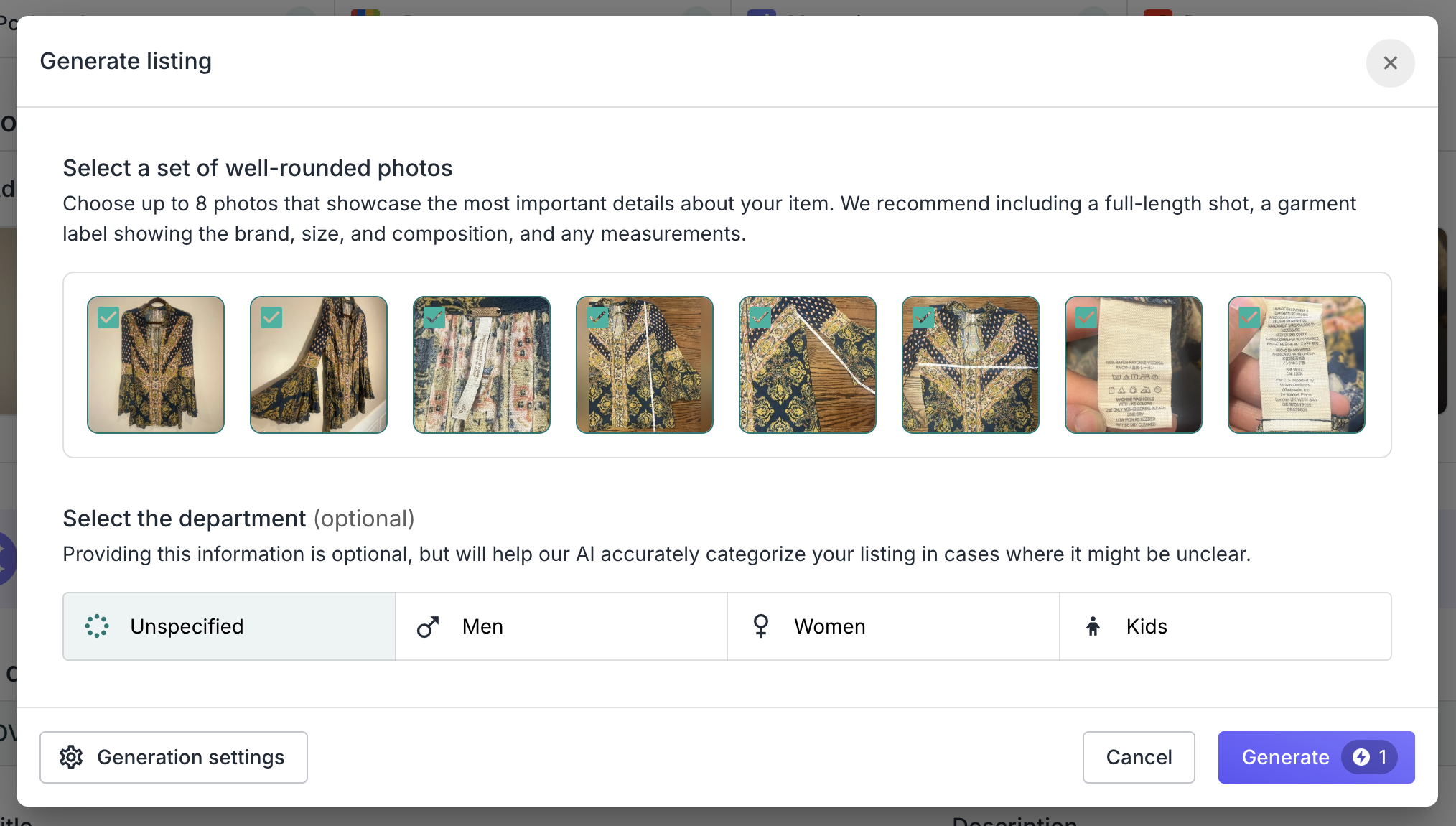
* **AI writes it.** Upload your photos and click **Generate listing**. The [**AI Listing Generator**](https://docs.nifty.ai/crosslisting/ai-listing-generator.md) writes the title, description, condition, and marketplace details from the photos alone. Review, adjust, and publish.
* **AI writes a batch.** Click **Bulk Generate**, upload photos for up to 30 items, and Nifty creates a draft for each one in the background.
Not ready to publish? Click **Save draft** and come back later. When a draft is done, toggle **Ready to list**. Then pick your ready drafts from the **Drafts** filter and publish them now or schedule them for later. See [Drafts and Scheduling](https://docs.nifty.ai/crosslisting/drafts-and-scheduling.md).
### Way 2: List on a marketplace, then crosslist from Nifty
Prefer to create your first listing directly on a marketplace? Nifty supports that workflow, too. Start here if you already have inventory on one marketplace and gaps everywhere else.
1. List on your marketplace the way you always have.
2. In the [**Inventory Manager**](https://app.nifty.ai/inventory), click **Resync**. The new listing shows up as a row with an empty square for each marketplace it isn't on yet.
3. Click an empty square to [**List on Marketplace**](https://docs.nifty.ai/crosslisting/list-on-marketplace.md). Nifty uses AI to prefill as much as it can from the row's other listings. All you have to do is review it, add any missing details, and click **List item**.
Have a backlog? [**Bulk Crosslisting**](https://docs.nifty.ai/crosslisting/bulk-crosslisting.md) fills every empty square in a few clicks: select the rows, click **Crosslist** in the **Bulk action bar**, and pick your marketplaces. You can review the results as drafts or publish them right away.
### Advanced: work through an AI assistant
You can also run your store by chatting instead of clicking. [**Ask Otto**](https://docs.nifty.ai/otto/ask-otto.md), Nifty’s built-in assistant, sees your Nifty data. Use it to check your inventory and sales, or have it edit items, manage labels, and crosslist. Otto waits for your approval before anything goes live.
If you already work in ChatGPT, Claude, or Gemini, you can connect Nifty there instead. Follow the setup for your assistant in [Connect via MCP](https://docs.nifty.ai/mcp-server/mcp-server.md). This is a beta feature: changes made by an assistant apply immediately, so only connect assistants you trust.
### Set up AI generation
Both ways above lean on AI to write listings — [**List on Marketplace**](https://docs.nifty.ai/crosslisting/list-on-marketplace.md), [**Bulk Crosslisting**](https://docs.nifty.ai/crosslisting/bulk-crosslisting.md), **Generate listing**, and **Bulk Generate**. AI works with no setup, but four settings make the results fit the way you sell. Set them once and every generated listing follows them.
{% stepper %}
{% step %}
#### Choose your primary marketplace
Go to Settings → [**Marketplaces**](https://app.nifty.ai/settings/connections) and click **Set as primary** on the marketplace you start from. Your primary marketplace is your home base: the price you set there is what every other marketplace's price is calculated from.
{% endstep %}
{% step %}
#### Set your Pricing Rules
Go to Settings → [**Pricing Rules**](https://app.nifty.ai/settings/pricing-rules). Each marketplace’s price is calculated from your primary’s. The defaults cover each marketplace’s fees (Poshmark takes 20%, Mercari 10%), so most sellers don’t change anything. You can adjust by a percentage or dollar amount, set a price ending, or override a single listing. See [Pricing Rules](https://docs.nifty.ai/crosslisting/pricing-rules.md).
{% endstep %}
{% step %}
#### Create your Shipping Presets
Go to Settings → [**Shipping Presets**](https://app.nifty.ai/settings/shipping-presets) and create one preset per package type you actually send. Give each a usage condition in categorical words, like "t-shirts and tops" or "shoes (excluding boots)", not weights. AI reads these to pick the right preset for each item. See [Shipping presets](https://docs.nifty.ai/crosslisting/listing-shortcuts.md#shipping-presets).
{% endstep %}
{% step %}
#### Write your generation instructions
Go to Settings → [**AI Generation**](https://app.nifty.ai/settings/ai-generation). Try it empty first: the default is an SEO-optimized baseline. Then add plain-English instructions for the sections you’d change: Title, Description, Condition, SKU.
A good test: could a friend with your photos and these instructions write the listing the way you would?
{% hint style="success" %}
**Shortcut:** Paste a few listings you're proud of into [**Ask Otto**](https://docs.nifty.ai/otto/ask-otto.md) and ask it to draft your generation instructions from them. Then paste the result into Settings → **AI Generation** and fine-tune from there.
{% endhint %}
See [Custom instructions](https://docs.nifty.ai/crosslisting/ai-listing-generator.md#custom-instructions) for how your instructions combine with the defaults.
{% endstep %}
{% endstepper %}
---
# Agent Instructions
This documentation is published with GitBook. GitBook is the documentation platform designed so that both humans and AI agents can read, navigate, and reason over technical content effectively. Learn more at gitbook.com.
## Querying This Documentation
If you need additional information that is not directly available in this page, you can query the documentation by asking a question.
Perform an HTTP GET request on the following URL with the `ask` and `goal` query parameters:
```
GET https://docs.nifty.ai/getting-started/ways-to-work.md?ask=&goal=
```
`ask` is the immediate question: it should be specific, self-contained, and written in natural language.
`goal` is what the user is ultimately trying to achieve, the reason they need the answer. Sharing it helps GitBook give you a better, more relevant answer. A goal is most helpful when it describes the outcome the user wants rather than restating the question. For example, with `ask=how do I create an API token`, a goal like `automate deployments from our CI pipeline` lets GitBook tailor the answer to that use case.
The response will contain a direct answer to the question and relevant excerpts and sources from the documentation.
Use this mechanism when the answer is not explicitly present in the current page, you need clarification or additional context, or you want to retrieve related documentation sections.