> For the complete documentation index, see [llms.txt](https://docs.nifty.ai/llms.txt). Markdown versions of documentation pages are available by appending `.md` to page URLs; this page is available as [Markdown](https://docs.nifty.ai/getting-started/quickstart.md).
# Quickstart: Your First 30 Minutes
Ready to set yourself up for success? This guide walks you through the five steps to get Nifty running — most sellers finish in under 30 minutes.
{% hint style="info" %}
**Note:** If your plan only includes **Automation**, skip steps 2–4. If your plan only includes **Crosslisting**, skip step 5. During your free trial we recommend the **Bundle** plan so you can try everything — you can downgrade before your first month is billed.
{% endhint %}
{% stepper %}
{% step %}
### Connect your marketplaces
Go to Settings → [**Connections**](https://app.nifty.ai/settings/connections) and connect every marketplace you sell on. Poshmark, Mercari, and Whatnot connect fastest with the [Passwordless Chrome Extension](/connections/passwordless-chrome-extension.md); the other marketplaces send you to the marketplace to authorize Nifty.
After connecting, Nifty shows you which account it connected to and how many listings it found. Confirm it's the right one — if not, disconnect and try again.
{% hint style="warning" %}
**Brand new to a marketplace?** Make your first listing directly on that marketplace before you connect it. That first listing is what turns your account into a seller account — without it, the marketplace won't let Nifty list on your behalf.
{% endhint %}
{% endstep %}
{% step %}
### Sync your inventory
Go to the [**Inventory Manager**](https://app.nifty.ai/inventory) and click **Resync**. With one click, Nifty pulls every active listing from every connected marketplace. Our AI recognizes when the same item is listed on more than one marketplace and groups those listings onto a single row — no manual work required.
Think of Nifty as a mirror of your marketplaces. Over time, things that happen outside of Nifty make the mirror a little dirty, and [syncing](/inventory-management/sync-and-refresh.md) is how you wipe it clean. Run a **Full Sync** after connecting a new marketplace and about once a month after that.
{% endstep %}
{% step %}
### Verify the matches
After your first sync, we ask you to review the AI's grouping and **Verify** it. This step matters more than it looks: [**Auto-Delisting**](/auto-delisting/auto-delisting.md) only works on verified rows. If a row is incorrect — say you have one item in two sizes, and the listings got mixed up between rows — Nifty would take down the wrong listing when the item sells. So we wait for your okay before acting on a row.
Here's the fastest way through it:
1. In the filter bar, select **Listed**.
2. Sort by **Item name** using the dropdown in the top-right. This puts similar titles next to each other, so a listing that landed in the wrong row is usually right above or below where it belongs.
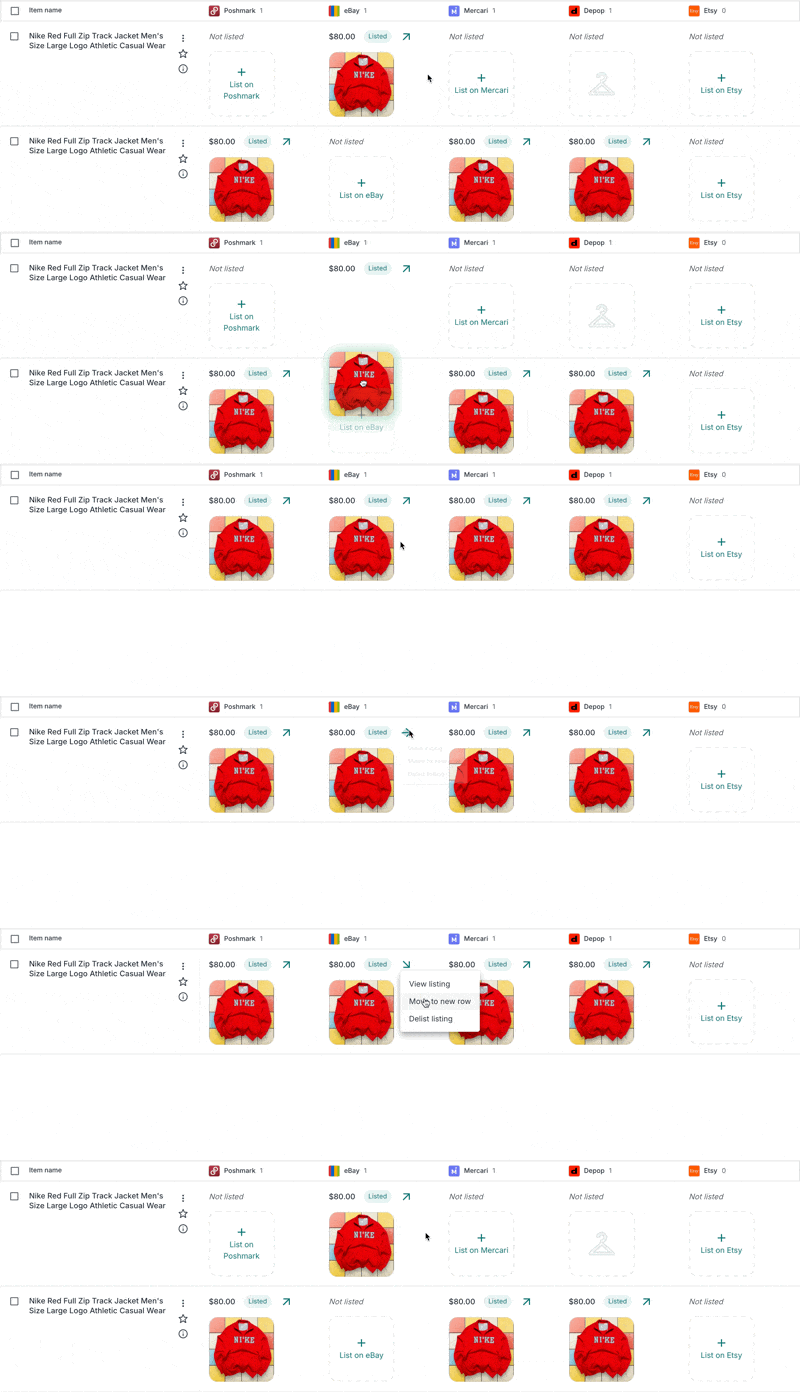
3. Skim one page at a time. If a listing is in the wrong row, drag and drop its photo into the correct one. This should take about 30 seconds per page.
4. Once the page looks right, select all rows using the checkbox at the top left and click **Verify** at the bottom. Then move on to the next page.
{% hint style="success" %}
**Tip:** If you know an item is listed on a marketplace but its row doesn't show it, search for a keyword from the title. That brings every matching row onto one screen, so you can drag the stray listing into place. While you're at it, clean up any [duplicates](/inventory-management/finding-and-fixing-duplicates.md) you spot.
{% endhint %}
This review is one-time and only for inventory you listed before Nifty. Anything you create or crosslist in Nifty is verified automatically.
{% endstep %}
{% step %}
### Enable Auto-Delisting
Now that your inventory is verified, go to Settings → [**Sale Detection**](https://app.nifty.ai/settings/sale-detection) and toggle on the marketplaces you want Nifty to auto-delist on.
When an item sells on one marketplace, Nifty takes it down everywhere else within 15 minutes — no more double sales. If you sell multi-quantity items, also turn on **Auto-Adjust Quantity** so Nifty lowers the quantity on your other listings instead of removing them. See the [Auto-Delisting setup guide](/auto-delisting/setup-guide.md) for the details.
{% endstep %}
{% step %}
### Turn on automations
Finally, go to the [**Dashboard**](https://app.nifty.ai/automation) and set up your automatic activities on each marketplace: [**Shares**](/automation/automatic-shares.md), [**Relists**](/automation/automatic-relists.md), [**Offers**](/automation/automatic-offers.md), and [**Follows**](/automation/automatic-follows.md). For each one, click **Get Started**, toggle on the features you want, and click **Save**. Not sure what an automation does? Each one has a **How it works** button.
Automations run in the cloud, so your device can be off. If a marketplace connection expires, its automations pause and turn themselves back on once you reconnect.
{% endstep %}
{% endstepper %}
### Best practices
A few habits keep Nifty an accurate reflection of what you have for sale:
* **Check your email and your Home page.** We send critical notifications about marketplace connection expirations, failed auto-delists, and payment issues, and the [**Needs attention**](/home/home.md#needs-attention) section on **Home** lists anything that needs action now. Missing these could interrupt your service or lead to double sales.
* **Edit inside Nifty.** When you change a title, price, or photo in the **Inventory Manager**, Nifty updates every marketplace at once and stays in sync. Edits made directly on a marketplace don't reach Nifty until your next sync.
* **Don’t relist outside of Nifty — and don’t use "end and sell similar" on eBay.** It creates a new listing Nifty can’t link to the old one, and Auto-Delisting on that item is unreliable until you regroup the rows by hand. Use Automatic Relists or Relist listing from the Inventory Manager instead. See [Why One Tool Matters](/getting-started/why-one-tool-matters.md).
* **Run a Full Sync once a month.** This brings in the most up-to-date data for all your active listings and wipes the mirror clean.
### You're all set!
That's it — you've connected your marketplaces, synced your inventory, verified the matches, enabled **Auto-Delisting**, and turned on **Automations**. Nifty will now run smoothly in the background.
Next, find the workflow that fits you in [Ways to Work in Nifty](/getting-started/ways-to-work.md), or jump straight into [**Crosslisting**](/crosslisting/crosslisting.md).
---
# Agent Instructions
This documentation is published with GitBook. GitBook is the documentation platform designed so that both humans and AI agents can read, navigate, and reason over technical content effectively. Learn more at gitbook.com.
## Querying This Documentation
If you need additional information that is not directly available in this page, you can query the documentation by asking a question.
Perform an HTTP GET request on the following URL with the `ask` and `goal` query parameters:
```
GET https://docs.nifty.ai/getting-started/quickstart.md?ask=&goal=
```
`ask` is the immediate question: it should be specific, self-contained, and written in natural language.
`goal` is what the user is ultimately trying to achieve, the reason they need the answer. Sharing it helps GitBook give you a better, more relevant answer. A goal is most helpful when it describes the outcome the user wants rather than restating the question. For example, with `ask=how do I create an API token`, a goal like `automate deployments from our CI pipeline` lets GitBook tailor the answer to that use case.
The response will contain a direct answer to the question and relevant excerpts and sources from the documentation.
Use this mechanism when the answer is not explicitly present in the current page, you need clarification or additional context, or you want to retrieve related documentation sections.