> For the complete documentation index, see [llms.txt](https://docs.nifty.ai/llms.txt). Markdown versions of documentation pages are available by appending `.md` to page URLs; this page is available as [Markdown](https://docs.nifty.ai/crosslisting/listing-shortcuts.md).
# Listing Shortcuts
Nifty offers several time-saving features to help you create listings faster and maintain consistency across your inventory.
### Where to find it
Go to the [**Inventory Manager**](/inventory-management/inventory-manager.md) and open an item in the **Listing form** (see [Creating and Editing Items](/crosslisting/creating-and-editing-items.md)). You’ll see these shortcuts throughout the form.
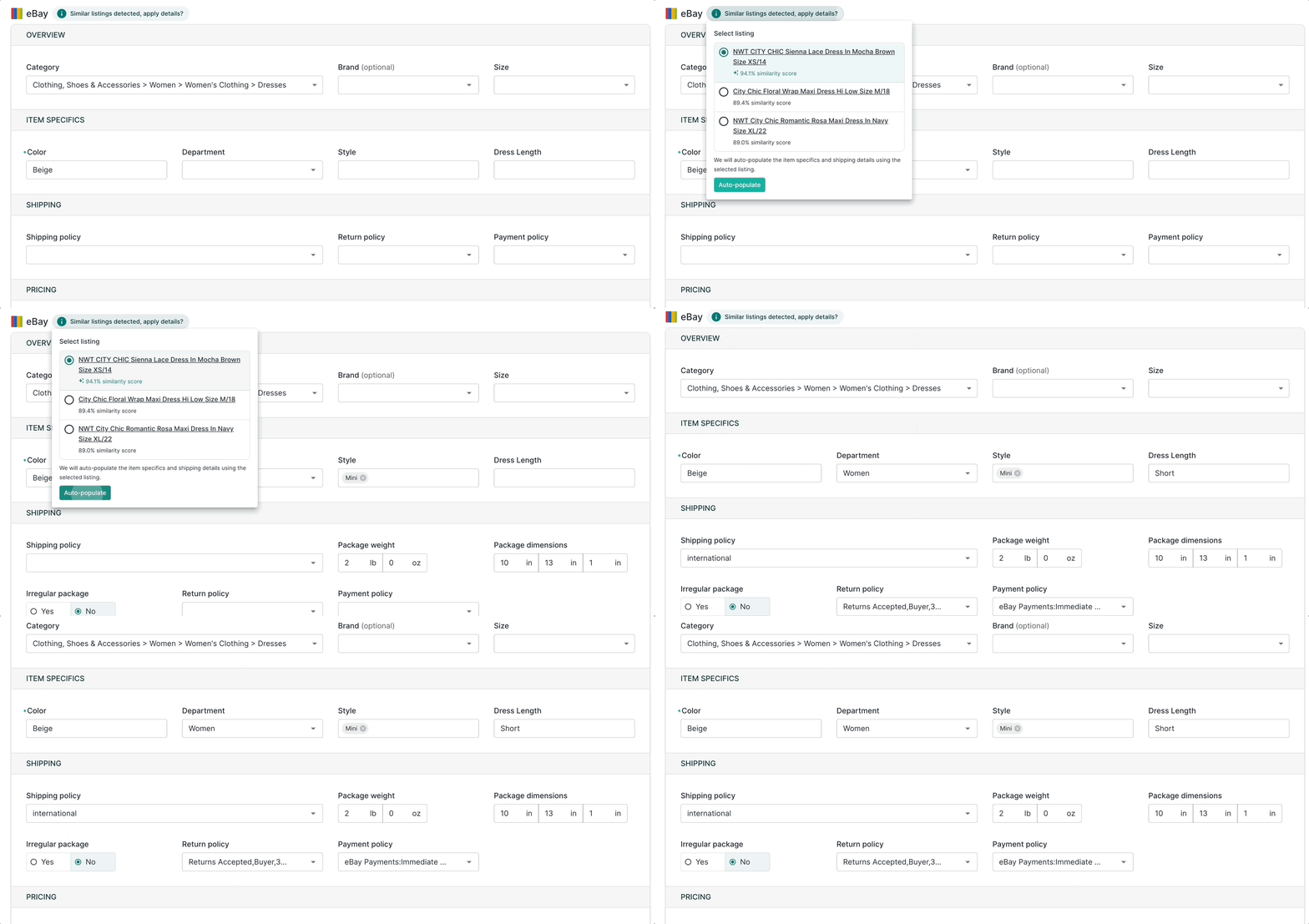
### Similar listings
When creating a new item, Nifty automatically suggests similar items from your inventory. Click any suggestion to populate item specifics and shipping details.
This helps you avoid manually creating templates — Nifty finds relevant matches based on what you're listing.
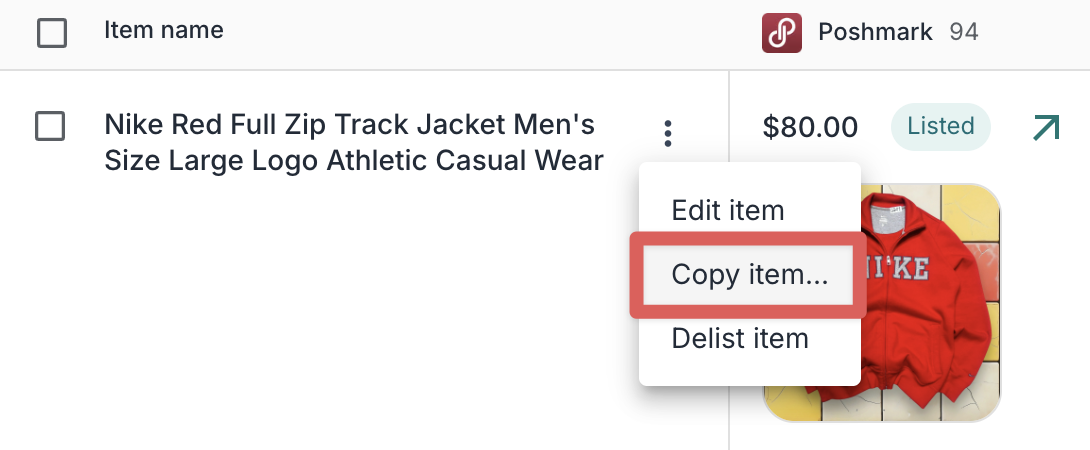
### Copy item…
Another option is to duplicate the details of an existing item by opening the **Item menu** and clicking **Copy item…**. This makes it quick to create a new item with the same information.
If there's an item you repeatedly duplicate, you can [**Favorite**](/inventory-management/organizing-your-inventory.md#favorites) it using the star button. This gives you quick access to the item whenever you need it.
### Relist listing
To bring a delisted listing back to a marketplace, click the **Listing menu** (green arrow above the photo) and select **Relist listing**. This is the fastest way to reactivate something you previously delisted.
{% hint style="info" %}
**Relist vs. Copy item:**
* **Relist listing** puts a delisted listing back on that marketplace. Same item row, same listing.
* **Copy item** creates a brand new item. Use this when the original sold (e.g., buyer cancelled) or when you have more of the same product.
{% endhint %}
### Shipping presets
Save time on repetitive shipping configurations by creating reusable presets in Settings → [**Shipping Presets**](https://app.nifty.ai/settings/shipping-presets).
When creating or editing an item, select a **Shipping preset** to apply those shipping settings across your selected marketplaces.
{% hint style="info" %}
**Note:** **Shipping presets** are on-the-fly transformations. They override the existing shipping details with the ones from the preset, but the preset itself is not saved alongside the item — just the results.
{% endhint %}
### Limitations
| Limitation | Details |
| ----------------------- | ------------------------------------------------------------------------------------------------------------------------------------------------------------------------------------------------------------------- |
| Saved listing templates | No traditional templates with pre-written text blocks. Use [**AI Generation with custom instructions**](/crosslisting/ai-listing-generator.md#custom-instructions), **Similar listings**, or **Copy item…** instead |
---
# Agent Instructions
This documentation is published with GitBook. GitBook is the documentation platform designed so that both humans and AI agents can read, navigate, and reason over technical content effectively. Learn more at gitbook.com.
## Querying This Documentation
If you need additional information that is not directly available in this page, you can query the documentation dynamically by asking a question.
Perform an HTTP GET request on the current page URL with the `ask` query parameter, and the optional `goal` query parameter:
```
GET https://docs.nifty.ai/crosslisting/listing-shortcuts.md?ask=&goal=
```
`ask` is the immediate question: it should be specific, self-contained, and written in natural language.
`goal` is optional and describes the broader end goal you are ultimately trying to accomplish on behalf of the user. GitBook uses it to tailor the answer towards what is most useful for that goal.
The response will contain a direct answer to the question and relevant excerpts and sources from the documentation.
Use this mechanism when the answer is not explicitly present in the current page, you need clarification or additional context, or you want to retrieve related documentation sections.
.png?alt=media)