> For the complete documentation index, see [llms.txt](https://docs.nifty.ai/llms.txt). Markdown versions of documentation pages are available by appending `.md` to page URLs; this page is available as [Markdown](https://docs.nifty.ai/crosslisting/bulk-crosslisting.md).
# Bulk Crosslisting
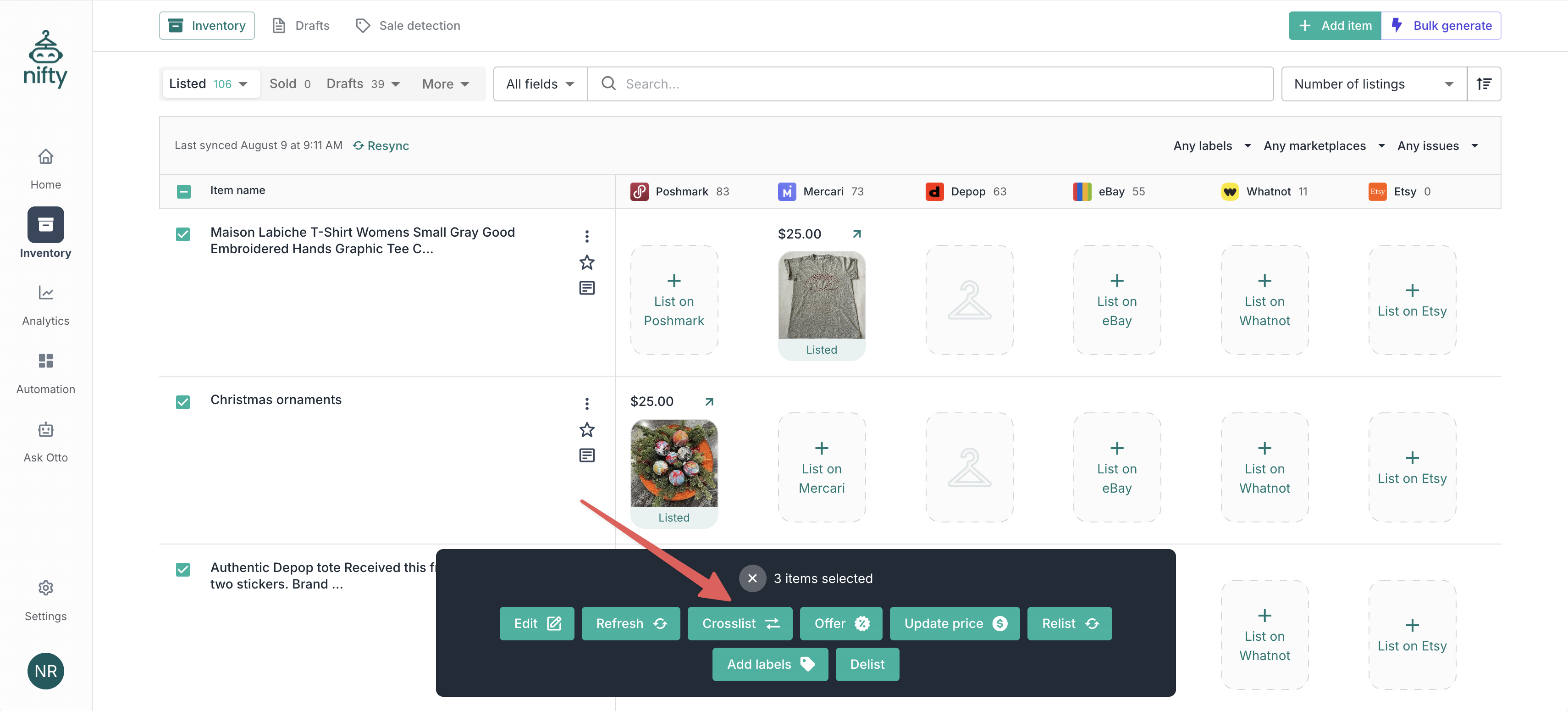
If you list on one marketplace, sync to Nifty, and then crosslist your items, **Bulk Crosslisting** is for you. Select multiple items and Nifty crosslists them instantly using AI.
### Where to find it
Select items in the [**Inventory Manager**](https://app.nifty.ai/inventory), then click **Crosslist** in the **Bulk action bar**.
### Before you start
Before Bulk Crosslisting, we recommend reviewing the following settings and making sure they line up with your listing practices:
1. **Primary Marketplace**: Your Primary Marketplace is the one you typically start with when listing. Head over to [Settings > Marketplaces](https://app.nifty.ai/settings/connections) and click **Set as primary**.
2. [**Pricing Rules**](/crosslisting/pricing-rules.md): Your Pricing Rules specify how your listings should be priced across marketplaces. Use these to account for typical expenses such as marketplace fees and shipping labels.
3. [**Shipping Presets**](/crosslisting/listing-shortcuts.md#shipping-presets): If you bulk crosslist different types of items at once, save time by writing a usage condition for each Shipping Preset. For best results, use categorical language (e.g., "Use for small accessories" rather than "Use for items under 4oz"). This will allow the AI to automatically choose the best preset per item.
### How it works
When you crosslist an existing item with **Bulk Crosslisting**:
1. You select the desired marketplaces, pricing, and shipping up-front.
2. Nifty reviews the existing listing data (everything from photos to item specifics).
3. Nifty uses AI to fill in all the details, returning complete, ready-to-post listings.
4. The listings can be saved as a draft for your review, or published immediately.
5. The new listings appear in the same row as the original — linked for [**Auto‑Delisting**](/auto-delisting/auto-delisting.md).
{% hint style="info" %}
If your original listing(s) have a title or description that could be improved per your **Custom instructions**, Bulk Crosslisting will modify these fields on your existing listing(s) as well.
{% endhint %}
### How to bulk crosslist
1. In the **Inventory Manager**, select the items you want to crosslist.
2. Click **Crosslist** in the **Bulk action bar**.
3. Choose the marketplaces you want to crosslist to.
4. Confirm your pricing. Your Pricing Rules are prefilled, and you can adjust them as needed.
5. Select a Shipping Preset. If you have usage conditions set up, you can let AI choose the best one for each item automatically.
6. Choose how you want the results to be saved — either as drafts that you can review later, or published listings that go live as soon as they're generated.
7. Click **Bulk crosslist**.
Your listings are generated in the background, so you can keep working while we process them.
### Finding your new listings
Drafts are waiting under **Listed** → **Bulk crosslisted** in the **Inventory Manager**. From there, you can click the **Item menu → Edit item** to open the existing listings and newly created drafts at once.
If you chose **Publish now**, your listings go live without a review step. Anything that can't be published is saved as a draft with a **Publishing error** so nothing is lost — for example, if AI couldn't find a shipping preset that fits the item.
### Smart Credits
Bulk Crosslisting uses 1 **Smart Credit** per item. See [**Smart Credits**](/crosslisting/smart-credits.md) for details on costs and monthly allocations.
---
# Agent Instructions
This documentation is published with GitBook. GitBook is the documentation platform designed so that both humans and AI agents can read, navigate, and reason over technical content effectively. Learn more at gitbook.com.
## Querying This Documentation
If you need additional information that is not directly available in this page, you can query the documentation dynamically by asking a question.
Perform an HTTP GET request on the current page URL with the `ask` query parameter, and the optional `goal` query parameter:
```
GET https://docs.nifty.ai/crosslisting/bulk-crosslisting.md?ask=&goal=
```
`ask` is the immediate question: it should be specific, self-contained, and written in natural language.
`goal` is optional and describes the broader end goal you are ultimately trying to accomplish on behalf of the user. GitBook uses it to tailor the answer towards what is most useful for that goal.
The response will contain a direct answer to the question and relevant excerpts and sources from the documentation.
Use this mechanism when the answer is not explicitly present in the current page, you need clarification or additional context, or you want to retrieve related documentation sections.