> For the complete documentation index, see [llms.txt](https://docs.nifty.ai/llms.txt). Markdown versions of documentation pages are available by appending `.md` to page URLs; this page is available as [Markdown](https://docs.nifty.ai/connections/passwordless-chrome-extension.md).
# Passwordless Chrome Extension
If you sell on Poshmark, Mercari, or Whatnot and have access to a computer, it's worth familiarizing yourself with Nifty's **Passwordless Chrome Extension**. It’s quick, easy, and guaranteed to work.
{% hint style="info" %}
**Requirements:** The extension only works with Google Chrome on a computer. It isn't available on mobile browsers or other desktop browsers.
{% endhint %}
### How to set it up
1. In Google Chrome on a computer, open our [Chrome extension](https://chromewebstore.google.com/detail/nifty/ggcfdkgmekpddencdddinlmpekbcohoa).
2. Click **Add to Chrome**, then confirm when prompted.
3. From the same browser, log into your marketplace account (Poshmark, Mercari, or Whatnot).
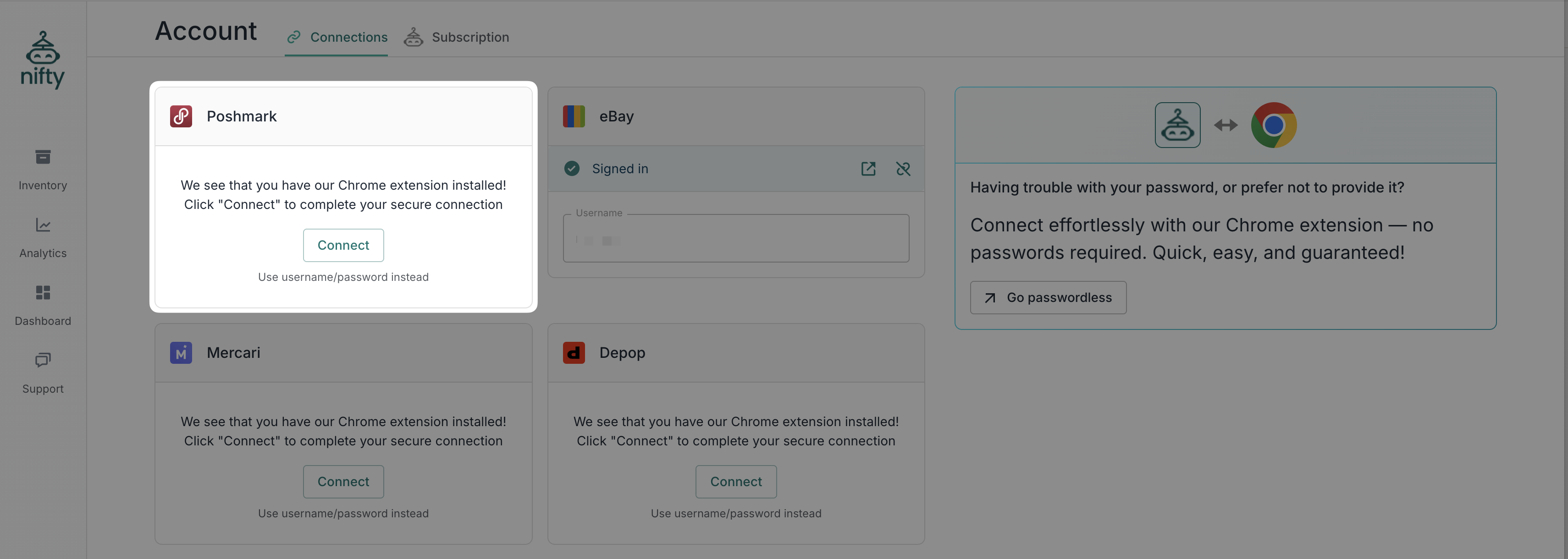
4. Go back to Settings → [**Connections**](https://app.nifty.ai/settings/connections) — you'll see a **Connect** button instead of a password field.
### How it works
The extension uses your existing session with poshmark.com, mercari.com, or whatnot.com and shares it with Nifty so we can connect without you typing your marketplace password into Nifty.
### How it affects your service
It doesn't! The extension is only used for the initial connection — it doesn't change how Nifty works. Nifty still runs entirely in the cloud, and you don't need to keep the extension installed or your computer on after connecting.
### Troubleshooting
**Not seeing the Connect button?** Make sure you're using Google Chrome on a computer and that the extension is installed and enabled — other browsers aren't supported.
**Clicked Connect but got a login page?** This usually means you're not logged into the marketplace on your current browser. Log in and confirm the connection by visiting the marketplace directly (for example, poshmark.com), then try again.
**Connection won't establish or disconnects immediately?** Your session may be stale. Sign out of the marketplace, sign back in, then use the extension again.
**Stuck in a connection loop?** If the connection window opens and immediately closes, the Nifty extension likely doesn't have the necessary permissions to access site data.
1. **Open Extension Settings**: Click the Nifty Extension, and select Manage Extension. If you don't see it, try clicking the **Puzzle Piece icon** in your browser.\

2. **Adjust Site Access:** Scroll to the Site Access section.
3. **Enable Permissions:** Toggle the setting to "On" for all websites.\

4. **Retry:** Restart your browser and try connecting again.
### Reconnecting
When you're automatically logged out of a marketplace (a normal security feature), connections made via the extension will expire too. To reconnect, make sure the extension is still installed, log back into the marketplace, and click **Connect** on Nifty.
---
# Agent Instructions
This documentation is published with GitBook. GitBook is the documentation platform designed so that both humans and AI agents can read, navigate, and reason over technical content effectively. Learn more at gitbook.com.
## Querying This Documentation
If you need additional information that is not directly available in this page, you can query the documentation dynamically by asking a question.
Perform an HTTP GET request on the current page URL with the `ask` query parameter, and the optional `goal` query parameter:
```
GET https://docs.nifty.ai/connections/passwordless-chrome-extension.md?ask=&goal=
```
`ask` is the immediate question: it should be specific, self-contained, and written in natural language.
`goal` is optional and describes the broader end goal you are ultimately trying to accomplish on behalf of the user. GitBook uses it to tailor the answer towards what is most useful for that goal.
The response will contain a direct answer to the question and relevant excerpts and sources from the documentation.
Use this mechanism when the answer is not explicitly present in the current page, you need clarification or additional context, or you want to retrieve related documentation sections.