> For the complete documentation index, see [llms.txt](https://docs.nifty.ai/llms.txt). Markdown versions of documentation pages are available by appending `.md` to page URLs; this page is available as [Markdown](https://docs.nifty.ai/automation/automatic-shares.md).
# Automatic Shares
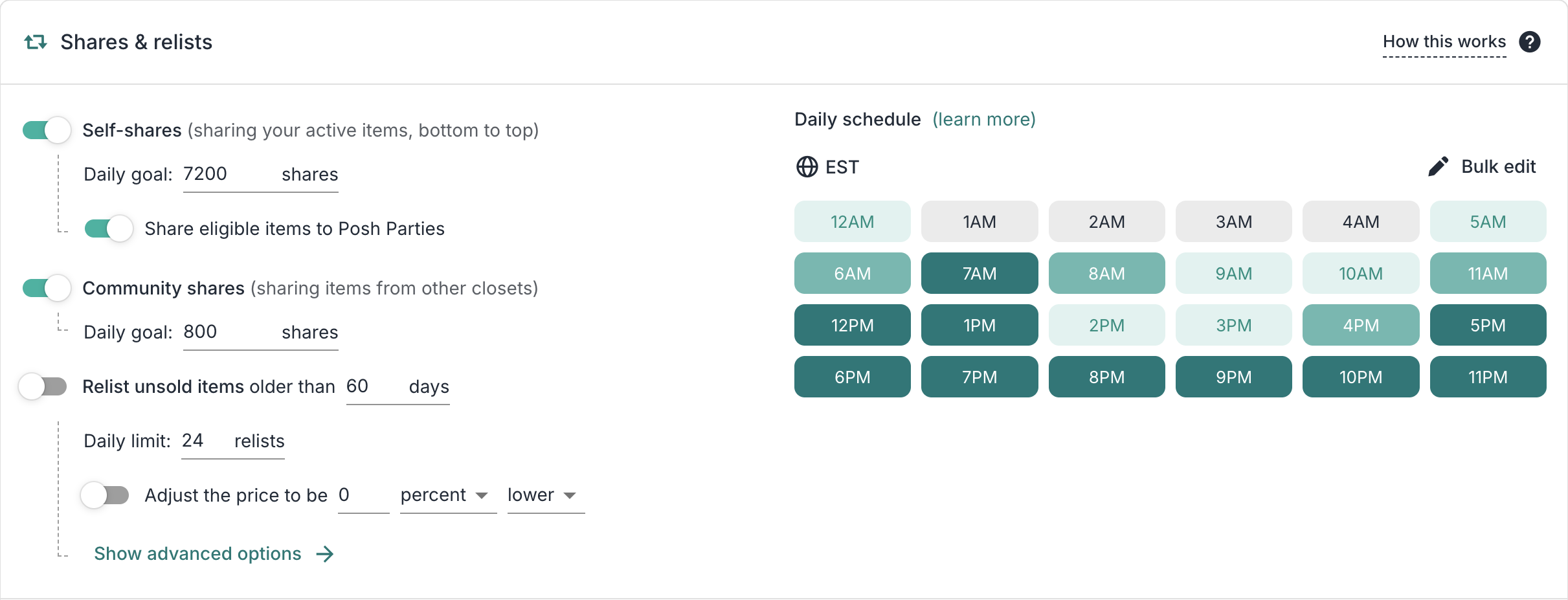
Sharing is essential on Poshmark — it keeps your listings visible in followers' feeds and search results. Nifty automates this so you don't have to sit there tapping all day.
### Where to find it
Go to the [**Dashboard**](https://app.nifty.ai/automation) → **Poshmark** → **Shares & Relists**.
### How it works
Nifty works from bottom to top so your closet stays organized exactly how you arranged it. As we move through, we check each item: relist if it's old enough and matches your criteria, party share if there's an eligible party, or regular share otherwise.
### Types of shares
**Self-shares** — Sharing your own listings to your followers' feeds.
**Party shares** — Poshmark hosts daily themed parties at 9 AM, 12 PM, 4 PM, and 7 PM Pacific. If Nifty is sharing an eligible item during a party, we share to the party instead. We don't rearrange your closet to chase parties — they happen naturally as we work through your items.
**Community shares** — Sharing other sellers' listings. We find sellers who recently shared your listings and return the favor. Community shares are a requirement to gain and maintain Posh Ambassador status.
{% hint style="info" %}
**Note:** Party shares are a type of self-share. If you request 8,000 shares total and see 7,000 self-shares + 1,000 party shares, that's correct — you got your full 8,000.
{% endhint %}
### Setting up shares
#### Daily goals
Nifty recommends a daily number based on your closet size. You can adjust this, but the maximum is 8,000 self-shares per day.
**Why the limit?** Poshmark monitors for spam-like activity. Our limits are calibrated to keep your account safe while maximizing visibility.
#### Daily schedule
By default, Nifty targets peak hours based on historical sales data.
If you want full control, you can set your own 24-hour schedule. For each hour, pick an intensity: none, low, medium, or high. Nifty distributes your total daily shares across the hours based on these settings.
**Our recommendation:** Aim for at least 16 hours of active share time with varied intensity throughout.
**Why?** Think of it like driving 8,000 miles. If someone tells you to drive "fast" the entire time, that's not really fast — it's just one constant speed. Fast only means something compared to slow.
Same with share intensity. If every hour is set to "high," you're just sharing at a constant rate all day. Crank up the speed thoughtfully, to match when you believe your buyers are online.
### Large closets (5,000+ items)
For closets with more than 5,000 active listings, we take a special approach to handle a Poshmark platform limitation. While shoppers and most sharing tools can only access the first 5,000 items in your closet, Nifty has developed a unique solution that ensures every single listing in your inventory gets shared. This means no matter how large your closet grows, Nifty will continue to effectively share all your items.
### Limitations
| Limitation | Details |
| ------------------------- | ------------------------------------ |
| Share more than 8,000/day | Maximum for account safety |
| Share sold items | Nifty only shares active listings |
| Share specific items only | All active listings are included |
| Force party shares | Parties happen naturally as we share |
---
# Agent Instructions
This documentation is published with GitBook. GitBook is the documentation platform designed so that both humans and AI agents can read, navigate, and reason over technical content effectively. Learn more at gitbook.com.
## Querying This Documentation
If you need additional information that is not directly available in this page, you can query the documentation dynamically by asking a question.
Perform an HTTP GET request on the current page URL with the `ask` query parameter, and the optional `goal` query parameter:
```
GET https://docs.nifty.ai/automation/automatic-shares.md?ask=&goal=
```
`ask` is the immediate question: it should be specific, self-contained, and written in natural language.
`goal` is optional and describes the broader end goal you are ultimately trying to accomplish on behalf of the user. GitBook uses it to tailor the answer towards what is most useful for that goal.
The response will contain a direct answer to the question and relevant excerpts and sources from the documentation.
Use this mechanism when the answer is not explicitly present in the current page, you need clarification or additional context, or you want to retrieve related documentation sections.