> For the complete documentation index, see [llms.txt](https://docs.nifty.ai/llms.txt). Markdown versions of documentation pages are available by appending `.md` to page URLs; this page is available as [Markdown](https://docs.nifty.ai/automation/automatic-offers/automatic-offers-poshmark.md).
# Automatic Offers: Poshmark
Poshmark's offer system is powerful — 67% of sales come from offers. Automate it with Nifty.
### Where to find it
Go to the [**Dashboard**](https://app.nifty.ai/automation) and find Poshmark → Offers.
### Offer types
Poshmark has two types of offers:
**Offers to Likers** go out to all likers, require a minimum 10% discount, and show up in the news feed. A shipping discount is optional.
**Bundle Offers** are private (seller to buyer), have no minimum discount, and don't show up in the feed. To view them on web, go to [My Offers](https://poshmark.com/offers/my_offers). In the app, tap **Offers** → **View All Active Offers**.
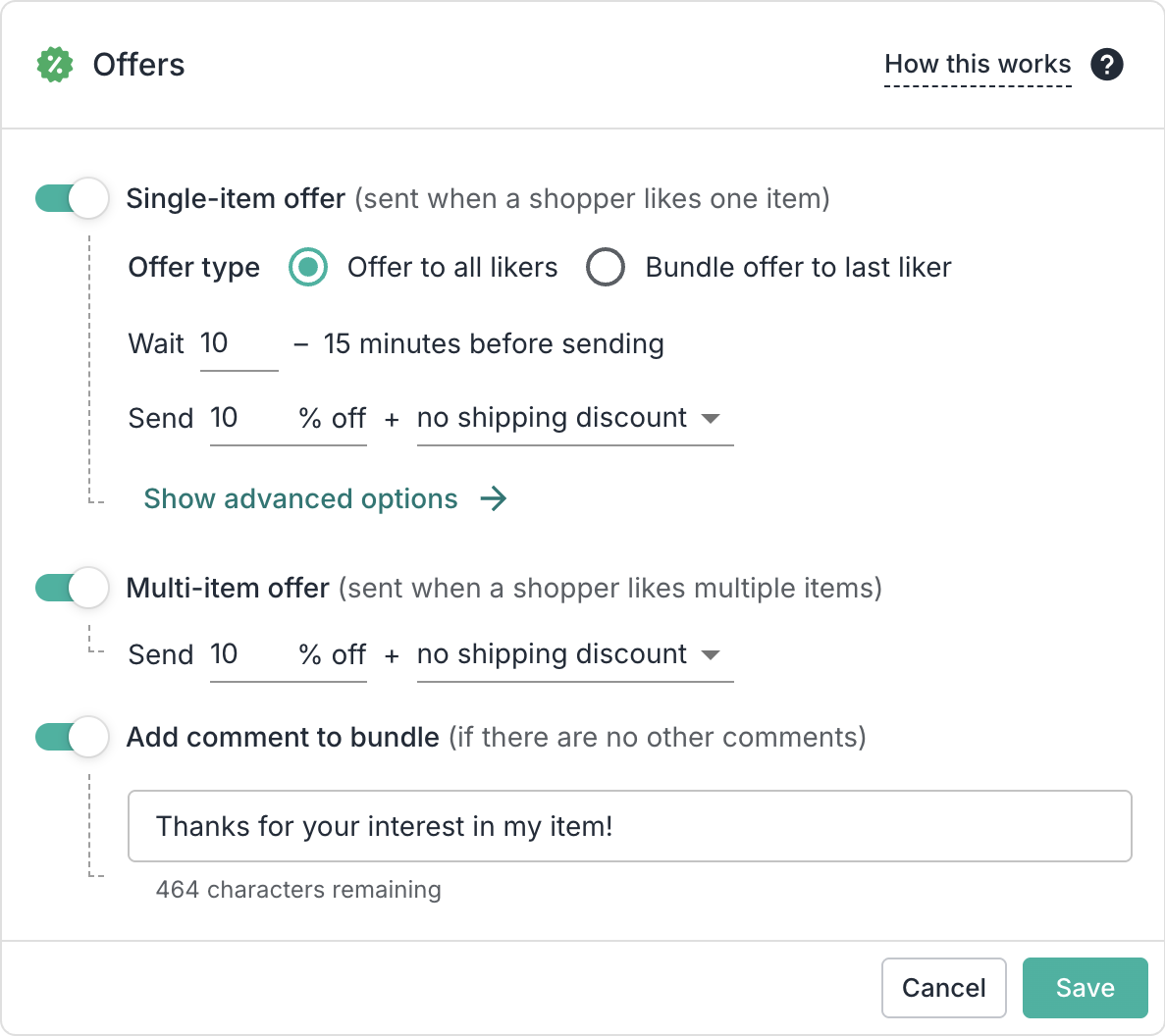
Nifty supports both. When a shopper likes one item, you choose how the offer is sent. When a shopper likes multiple items, you can set up a **Multi-item offer** (always sent as a bundle offer), or turn this off to only send single-item offers.
### Setting up offers
**Single-item offer:**
* **Offer type:** How you want to send the offer. See [Offer Types](#offer-types) for details.
* **Timing:** Choose when to send the offer after a like. You pick a 5-minute window, up to 3 hours later.
* **Discount:** Minimum 10% off.
* **Shipping discount:** Optional for both offer types. Leave it at **None** to send the price discount on its own; any shipping discount you add comes out of your earnings.
**Multi-item offer**: If enabled, Nifty detects when a buyer is done browsing your closet by waiting for an extended break in their like activity. Then we send a bundle offer for everything they liked.
**Bundle comment:** If you send a bundle offer (either via the single- or multi- item offer), and there are no other comments on the bundle, Nifty will add this as the first comment.
{% hint style="warning" %}
**Important:** Nifty will only add a comment if there are no other comments on the bundle.
{% endhint %}
### Public bundle discount
If you have a public bundle discount on Poshmark, your automatic offer must be at least $1 lower than that discount. This is a Poshmark requirement — private offers must be better than what's publicly available.
Nifty handles this automatically. If your automatic offer does not beat your public offer, we'll adjust the price in order to successfully send the offer.
### Limitations
| Limitation | Details |
| ------------------------ | -------------------------------------------------------------------------------------------------------------------------------------------------------------------------------- |
| Whole number pricing | Poshmark only allows whole dollar amounts. Offers are rounded down. |
| Multi-quantity purchases | If a buyer likes a multi-quantity item and then buys it before we can send the offer, the offer will still be sent (because the item is still active when we check eligibility). |
| Send to existing likers | Only new likes trigger offers |
---
# Agent Instructions
This documentation is published with GitBook. GitBook is the documentation platform designed so that both humans and AI agents can read, navigate, and reason over technical content effectively. Learn more at gitbook.com.
## Querying This Documentation
If you need additional information that is not directly available in this page, you can query the documentation by asking a question.
Perform an HTTP GET request on the following URL with the `ask` and `goal` query parameters:
```
GET https://docs.nifty.ai/automation/automatic-offers/automatic-offers-poshmark.md?ask=&goal=
```
`ask` is the immediate question: it should be specific, self-contained, and written in natural language.
`goal` is what the user is ultimately trying to achieve, the reason they need the answer. Sharing it helps GitBook give you a better, more relevant answer. A goal is most helpful when it describes the outcome the user wants rather than restating the question. For example, with `ask=how do I create an API token`, a goal like `automate deployments from our CI pipeline` lets GitBook tailor the answer to that use case.
The response will contain a direct answer to the question and relevant excerpts and sources from the documentation.
Use this mechanism when the answer is not explicitly present in the current page, you need clarification or additional context, or you want to retrieve related documentation sections.