> For the complete documentation index, see [llms.txt](https://docs.nifty.ai/llms.txt). Markdown versions of documentation pages are available by appending `.md` to page URLs; this page is available as [Markdown](https://docs.nifty.ai/auto-delisting/sale-detection-tracker.md).
# Sale Detection Tracker
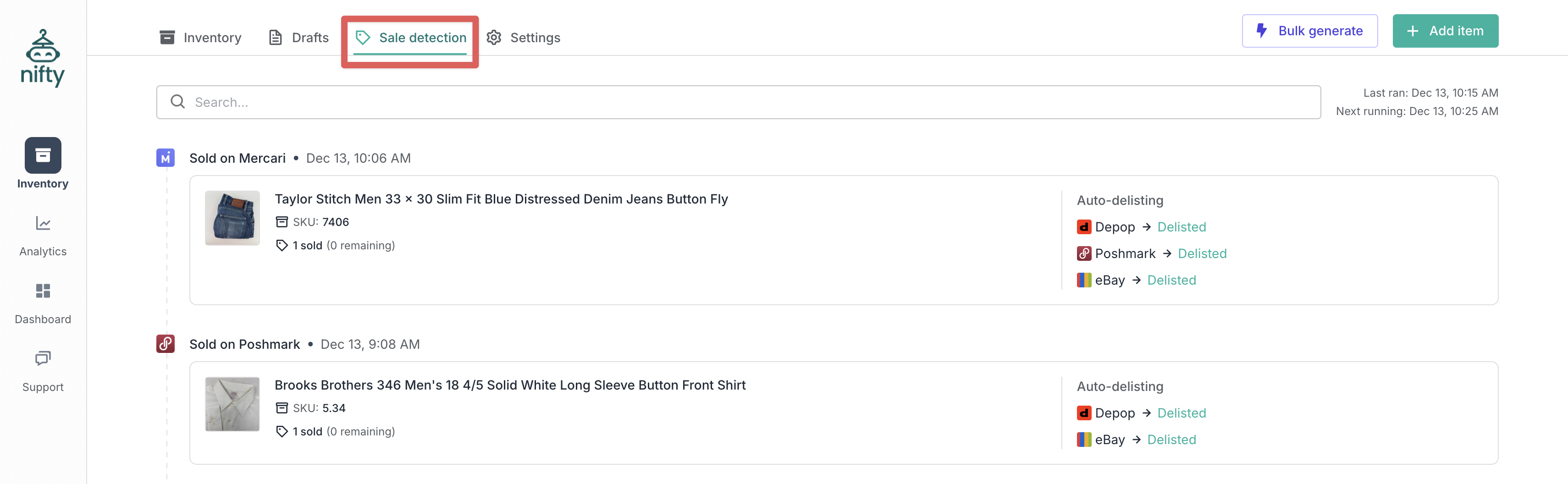
The **Sale Detection Tracker** shows every sale Nifty detects and exactly what happened with **Auto-Delisting**. Use it to confirm things are working or investigate when they're not.
### Where to find it
Go to [**Sale Detection**](https://app.nifty.ai/inventory/sales) (in the **Inventory Manager**).
### What the tracker shows
The tracker keeps 60 days of history. For each detected sale:
| Column | Description |
| ---------------------- | -------------------------------------- |
| **Item** | Photo, title, and SKU |
| **Sold on** | Which marketplace the sale occurred on |
| **Detected at** | When Nifty detected the sale |
| **Quantity** | How many sold, and how many remain |
| **Auto-delist status** | Outcome for each other marketplace |
### Status meanings
#### Success
| Status | What it means |
| -------------------------------------------- | -------------------------------------------- |
| **Delisted** | Successfully removed from that marketplace |
| **No action required: not listed elsewhere** | The item wasn't listed on other marketplaces |
| **No action required: already delisted** | The other listings were already removed |
#### Not attempted
| Status | What it means |
| --------------- | ------------------------------------------------------------------------- |
| **Not enabled** | Auto-delisting wasn't enabled for that marketplace when the sale occurred |
#### Failed
| Status | What it means |
| ------------------------------ | ------------------------------------------ |
| **Failed: Connection expired** | No active connection for that marketplace |
| **Failed: Unexpected error** | Something went wrong during auto-delisting |
{% hint style="success" %}
**Tip:** Anything showing as **Failed** also triggers an email notification — so you have two places to catch errors.
{% endhint %}
#### Ineligible
| Status | What it means |
| --------------------------------------------------- | --------------------------------------------------------------- |
| **Ineligible: item is not verified** | The item wasn't verified before being sold |
| **Ineligible: item is multi-variant** | Multi-variant items aren't supported |
| **Ineligible: Auto-Adjust Quantity is not enabled** | Multi-quantity item, but **Auto-Adjust Quantity** was off |
| **Ineligible: listing was not imported** | The item wasn't in your **Inventory Manager** before being sold |
| **Ineligible: item has mismatched quantities** | The item didn't have consistent quantities before being sold |
### When to use the tracker
* **Verifying setup** — After enabling auto-delisting, check that sales are being processed correctly.
* **Investigating issues** — When an item didn't delist, see exactly what went wrong.
* **After double sales** — Understand why auto-delisting didn't prevent it.
---
# Agent Instructions
This documentation is published with GitBook. GitBook is the documentation platform designed so that both humans and AI agents can read, navigate, and reason over technical content effectively. Learn more at gitbook.com.
## Querying This Documentation
If you need additional information that is not directly available in this page, you can query the documentation by asking a question.
Perform an HTTP GET request on the following URL with the `ask` and `goal` query parameters:
```
GET https://docs.nifty.ai/auto-delisting/sale-detection-tracker.md?ask=&goal=
```
`ask` is the immediate question: it should be specific, self-contained, and written in natural language.
`goal` is what the user is ultimately trying to achieve, the reason they need the answer. Sharing it helps GitBook give you a better, more relevant answer. A goal is most helpful when it describes the outcome the user wants rather than restating the question. For example, with `ask=how do I create an API token`, a goal like `automate deployments from our CI pipeline` lets GitBook tailor the answer to that use case.
The response will contain a direct answer to the question and relevant excerpts and sources from the documentation.
Use this mechanism when the answer is not explicitly present in the current page, you need clarification or additional context, or you want to retrieve related documentation sections.